
FREE WORDPRESS PLUGIN · BY VIDEOWHISPER
Turn your pictures into a place people want to browse.
Build a portfolio, collect event photos or give your community a home for its pictures. Picture Gallery combines four responsive layouts, PhotoSwipe browsing, frontend uploads and image editing on your own WordPress site.
Get the free plugin Browse the live pictures demo →
Use it on its own, or combine it with the FansPaySite turnkey solution for creator content and monetization.
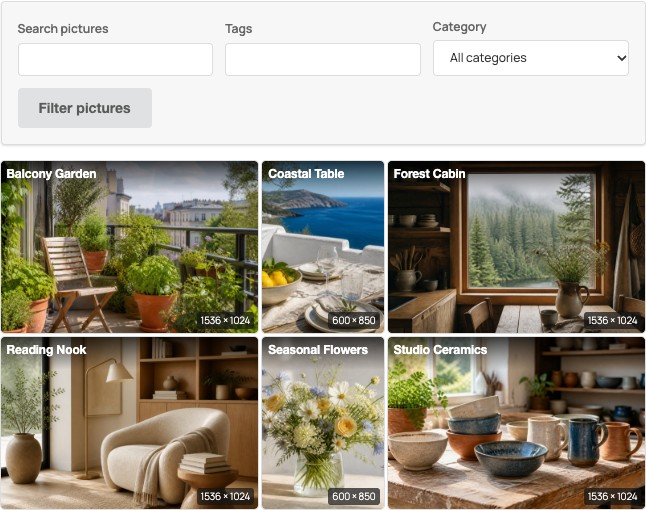
Choose the gallery that fits your content.
Styled Tiles
A compact photo wall with small gaps, resolution labels, filters and owner controls over the image.
Responsive grid
Dense, thumbnail-sized listings for collections visitors want to scan quickly. Fits narrow screens and supports light and dark themes.
Picture cards
Give each picture more context, with space for titles, captions, details and supported ratings.
Justified
Balanced rows of mixed portrait and landscape photos, with a selectable target height and a compact final row.
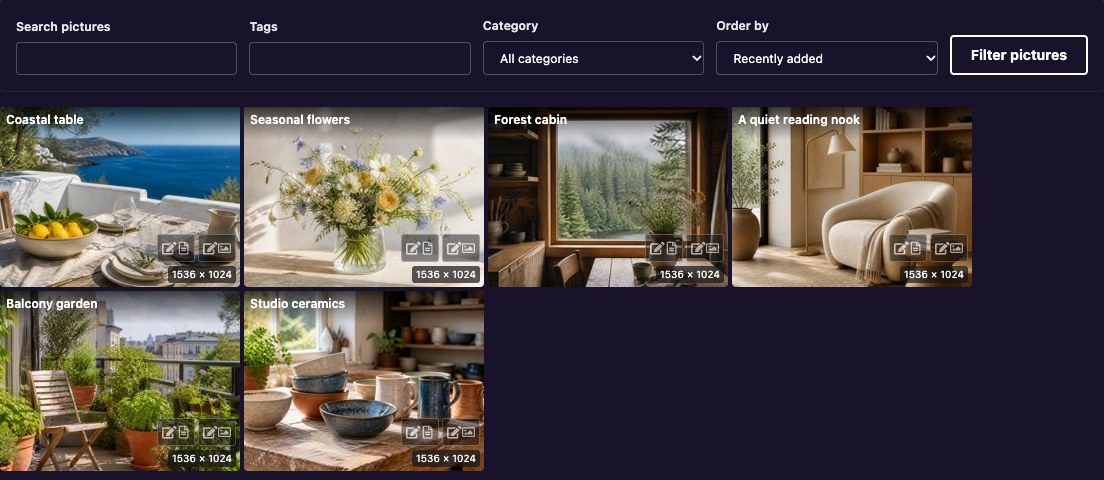
Choose a site default, configure each gallery block or shortcode, and preview layouts as an administrator. PhotoSwipe provides swipe and zoom browsing, larger previous/next previews, a moving thumbnail strip and a visible link to the picture post.
Let people contribute and manage their own pictures.
- Frontend uploads and My Pictures: members can upload, find their own pictures and use the available management controls without entering the WordPress dashboard.
- Local image tools: crop, resize, rotate and flip JPEG/PNG pictures. The original is retained; resizing does not enlarge the source.
- Picture details: edit titles, captions, descriptions and alternative text, with existing categories and tags where allowed.
- Review before publication: guest contributions remain pending, and contributors without publishing permission submit edits for review under the configured approval policy.
- Native Media Library picker: select existing images in the gallery block, retain native originals and optionally copy initial titles, captions and alternative text.
- Clear processing status: durable upload receipts and administrator journals help recover interrupted work without blindly uploading duplicates.
Responsive previews select suitable image candidates for the display. Optional WebP/AVIF output depends on your hosting libraries and site policy, with JPEG/PNG fallback. Originals and pending edits remain separate from approved previews.
A useful free gallery. A path to a complete creator site.
The gallery, frontend uploader, PhotoSwipe viewer and included image editor work without a paid account or streaming service.
For a creator business, the FansPaySite turnkey solution combines VideoWhisper plugins for pictures, videos, live sessions and other digital content. Optional MicroPayments integration supplies subscription and content-access policies; Rate Star Review supplies supported ratings and votes. Monetization and companion services have their own requirements and terms.
Picture visibility follows the configured gallery, ownership and supported membership rules. Private files need appropriate web-server or storage protection: hiding gallery links alone does not secure a publicly reachable upload URL.
Explore pictures in the FansPaySite demo · Explore a turnkey creator site · Ask about hosting or custom development
Start with one gallery.
- Install Picture Gallery from Plugins → Add New in WordPress, or download it from WordPress.org.
- Open Picture Gallery in the dashboard. Choose your workflow, layout, upload permissions and gallery pages.
- Add a Picture Gallery block and select Pictures or Media Library images. Shortcodes are also available, including
[videowhisper_pictures]and[videowhisper_pictures author_id="current"]for a member’s own pictures. - Review one upload and its publication permissions before inviting your community. Enable the optional guest form only where you want visitors to contribute.
Guest uploads: received, pending or on hold?
Add [videowhisper_picture_upload_guest] to the stored content of a normal WordPress page. Configure its destination, optional CAPTCHA, limits and notification address under Picture Gallery → Options → Guest Upload. Keep guest-form pages out of full-page caches and allow the site’s guest-upload cookie.
Approve a successfully received guest picture
Guest pictures are held for review, including when an administrator tests the guest form. In the dashboard, open Pictures → All Pictures → Pending, open the submitted picture, review it and select Publish. The usual list is /wp-admin/edit.php?post_type=picture&post_status=pending on your own site; installations with a customized post type use their configured picture list. A successful upload is not public until a moderator publishes it.
Moderator email is optional and can fail independently of the upload. You can review pending pictures without receiving an email. Current guest notification emails link to the picture’s editor.
Inspect “This upload needs administrator review”
This message is a processing or recovery hold, not confirmation that the image is awaiting ordinary publication. Keep the original browser and upload reference. Do not change browsers or repeatedly submit copies to work around it.
- As an administrator, open Picture Gallery → Upload Journals:
/wp-admin/admin.php?page=vwpg-uploadson your site. - Find the upload reference and inspect its processing and worker state. Use recovery only when offered; a safely recovered guest picture still needs review and publication.
- If no journal exists, processing may have stopped before it could be recorded. Use the displayed error code and reference to check the configured upload directory, writable local PHP temporary storage and file-lock support. A changed host, replaced lock or modified draft needs inspection; do not delete receipts or force a takeover.
If your upload screen shows only a generic message, update Picture Gallery and check the existing upload status before submitting another copy. Temporary-directory aliases and reliable file locking are hosting details for your administrator to investigate.
Requirements and common questions
What hosting do I need?
Current releases require WordPress 6.9+ and PHP 8.2+, with a working WordPress GD or Imagick image editor. Use a currently supported PHP branch for new hosting. Picture editing does not require FFmpeg or a live-streaming server. Memory, file dimensions and supported formats still limit processing.
Why can a small JPEG need more memory?
Decoded dimensions matter more than the compressed file size. Automatic processing budgets allow up to 512 MiB for ImageMagick HDRI and 256 MiB for other supported backends, reduced by actual PHP headroom and a reserve. Administrators can select a budget under Options → Display → Image processing budget (MiB). This does not raise the host’s PHP limit.
Does it support my language?
Bundled interface translations cover Romanian, Spanish, German, French, Brazilian Portuguese, Japanese, Italian, Dutch, Polish, Turkish and Arabic. They include machine-assisted work; native-speaker corrections are welcome. Interface translation does not translate submitted picture content.
Where can I report a problem or request a feature?
Use the Picture Gallery support forum for public plugin issues. For feature requests, private site details, hosting or custom development, contact VideoWhisper. Include the plugin version, WordPress/PHP versions and the displayed error code or upload reference. Do not post passwords, login cookies or private images publicly.
Download Picture Gallery free Try the live demo Plan your site with VideoWhisper